
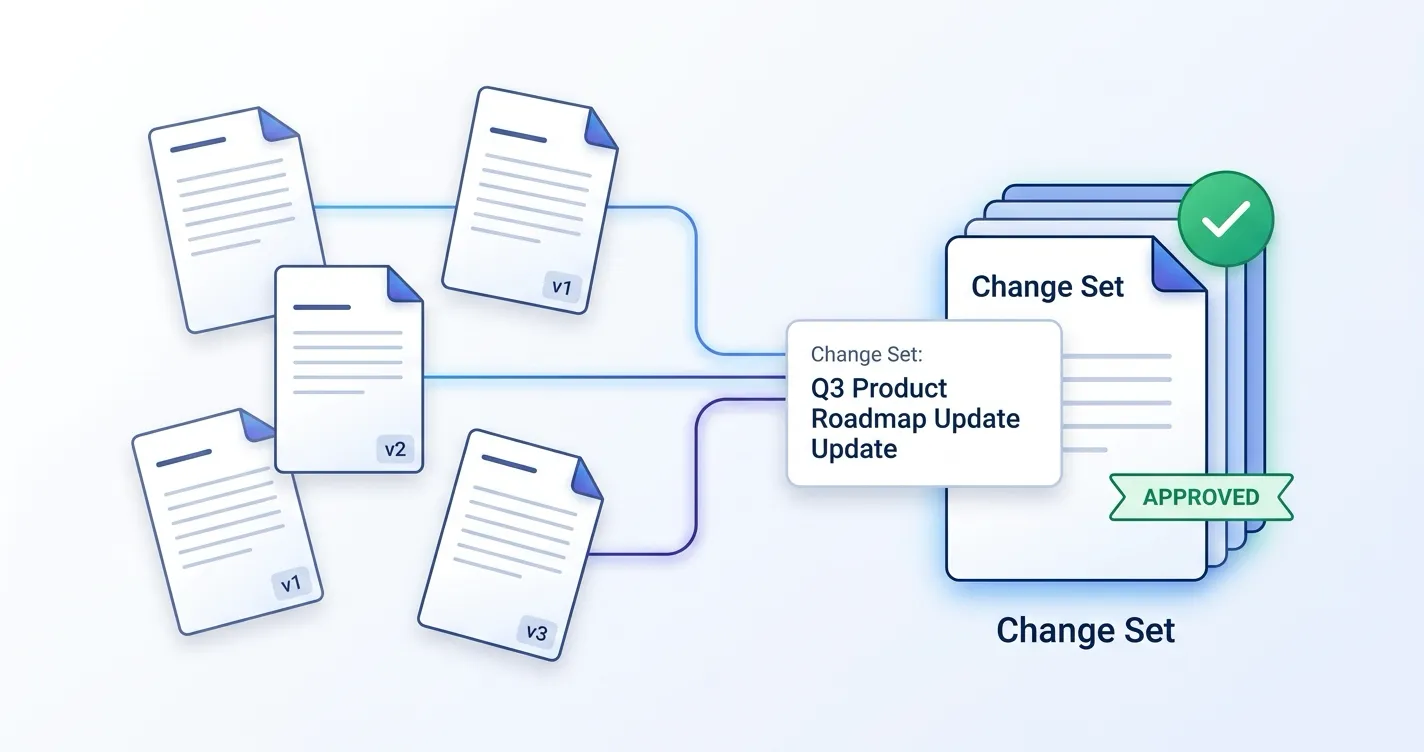
Teams that manage documentation in Confluence often face the same problem: a single change touches multiple pages, but each page goes through approval independently. Reviewers lack context about why pages changed together, and there is no single place to track the overall review status.
This problem is worse for teams using automation to update documentation. A pipeline editing 15 pages based on a code change has no way to tell reviewers “these all relate to PR-184” or submit them for review as a coordinated unit.
ApprovalFlow now solves this with Change Sets and a REST API.
What Are Change Sets?
A change set groups related Confluence page changes into a single review bundle with shared context. Instead of submitting pages for approval one at a time, you create a change set that includes:
- A title describing the change (e.g., “PR-184 Authentication docs update”).
- A summary explaining why these pages changed together.
- A reference URL linking to the source — a GitHub pull request, Jira issue, or any external URL.
- The list of pages included in the review.
Reviewers see the full scope of the change before they start reviewing. The change set title, summary, and reference URL appear in the space dashboard, in per-page Confluence comments, and in the audit trail.
Version-Aware Rollup State
Every change set has a computed rollup state based on the approval status of its pages:
| State | Meaning |
|---|---|
open | Change set created, no pages submitted yet |
in_review | Pages pending approval |
partially_approved | Some pages approved, others pending |
all_approved | Every page in the set approved |
has_rejections | One or more pages rejected |
stale | Approved pages were edited since approval |
The stale state is where version-aware approvals meet change sets. If anyone — or any automated process — edits a page after it was approved, the change set immediately reflects that the approval no longer covers the current content. This is the same version-tracking model that makes individual page approvals reliable, now applied across a coordinated set of pages.
The REST API
Change sets are useful from the UI, but the real power is programmatic access. ApprovalFlow now ships a REST API with 9 endpoints, authenticated via Atlassian 3-legged OAuth (3LO).
What You Can Do
| Action | Endpoint | Method |
|---|---|---|
| List change sets | /changeSets | GET |
| Get change set detail | /changeSets/detail | GET |
| Create change set | /changeSets | POST |
| Update change set | /changeSets/update | POST |
| Archive change set | /changeSets/archive | POST |
| Bulk submit | /changeSets/submit | POST |
| Preflight change set | /changeSets/preflight | POST |
| Submit single page | /pages/submit | POST |
| Preflight single page | /pages/preflight | POST |
Tip: The preflight endpoints are particularly valuable for CI/CD integration. Your automation can validate a change set before committing to the submission — no data is written during a preflight.
Authentication and Audit
The API uses Atlassian’s 3LO OAuth with two types of scopes:
Atlassian product scope (required):
read:forge-app:confluence— Enables external API access to ApprovalFlow’s Forge endpoints.
ApprovalFlow custom scopes:
read:change-set:custom— List and inspect change sets, run preflight checks.write:change-set:custom— Create, update, archive, and submit change sets.read:approval:custom— Preflight single pages.write:approval:custom— Submit single pages.
Note: A site administrator must first enable REST APIs for ApprovalFlow via Atlassian Administration > Connected Apps before external API calls will work.
Every API action is recorded in the audit trail with a (via API) marker and the OAuth client ID. Your team always knows whether a submission was initiated by a human or by automation.
Workflow: Automated Documentation Pipeline
Here is how an automated documentation workflow works with change sets end-to-end.
Step 1: Pipeline Edits Pages
A CI/CD pipeline processes a GitHub pull request and identifies 7 Confluence pages that need updates. It edits those pages via the Confluence REST API.
Step 2: Create a Change Set
The pipeline creates a change set via the API:
POST /changeSets
{
  "spaceId": "12345",
  "title": "PR-184 Auth token refresh update",
  "summary": "Updated 7 pages to reflect new token refresh behavior.",
  "referenceUrl": "https://github.com/org/repo/pull/184",
  "pageRefs": [
    { "pageId": "67890" },
    { "pageId": "67891" },
    { "pageId": "67892" },
    { "pageId": "67893" },
    { "pageId": "67894" },
    { "pageId": "67895" },
    { "pageId": "67896" }
  ]
}
Step 3: Preflight
Before submitting, the pipeline runs a preflight check:
POST /changeSets/preflight
{
  "changeSetId": "cs-abc123"
}
The response tells you exactly which pages are eligible and which are blocked:
{
  "success": true,
  "summary": { "total": 7, "submittable": 6, "blocked": 1 },
  "results": [
    { "pageId": "67890", "canSubmit": true, "workflowId": "wf-123" },
    { "pageId": "67893", "canSubmit": false, "reason": "No workflow assigned" }
  ]
}
Step 4: Bulk Submit
The pipeline submits all eligible pages in one call:
POST /changeSets/submit
{
  "changeSetId": "cs-abc123"
}
Six pages are submitted for approval. The blocked page is skipped with a clear reason. Confluence comments on each submitted page now include the change set title, summary, and a clickable link to the GitHub PR.
Step 5: Human Review
Product managers review the pages through the ApprovalFlow approval queue and page bylines. They see the shared context — they know these 6 pages all relate to PR-184 and why they changed. They approve or reject each page individually, and the change set rollup state updates automatically.
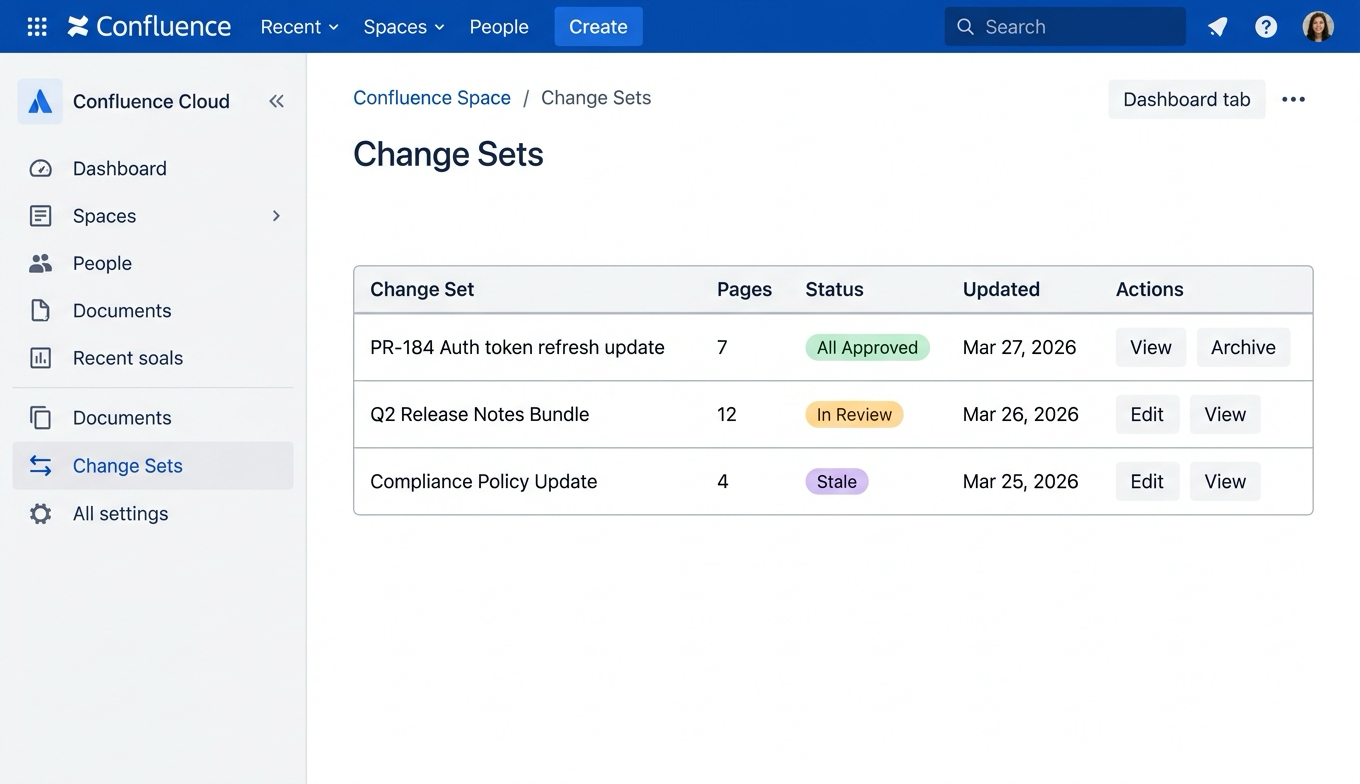
The Change Sets tab shows all review bundles in a space with rollup status, page counts, and quick actions.
Step 6: Resolution
Once all pages are approved, the change set reaches all_approved. If any page is edited after approval (by automation iterating, or by a human), the change set moves to stale — making it immediately clear that the approved state no longer reflects the current content.
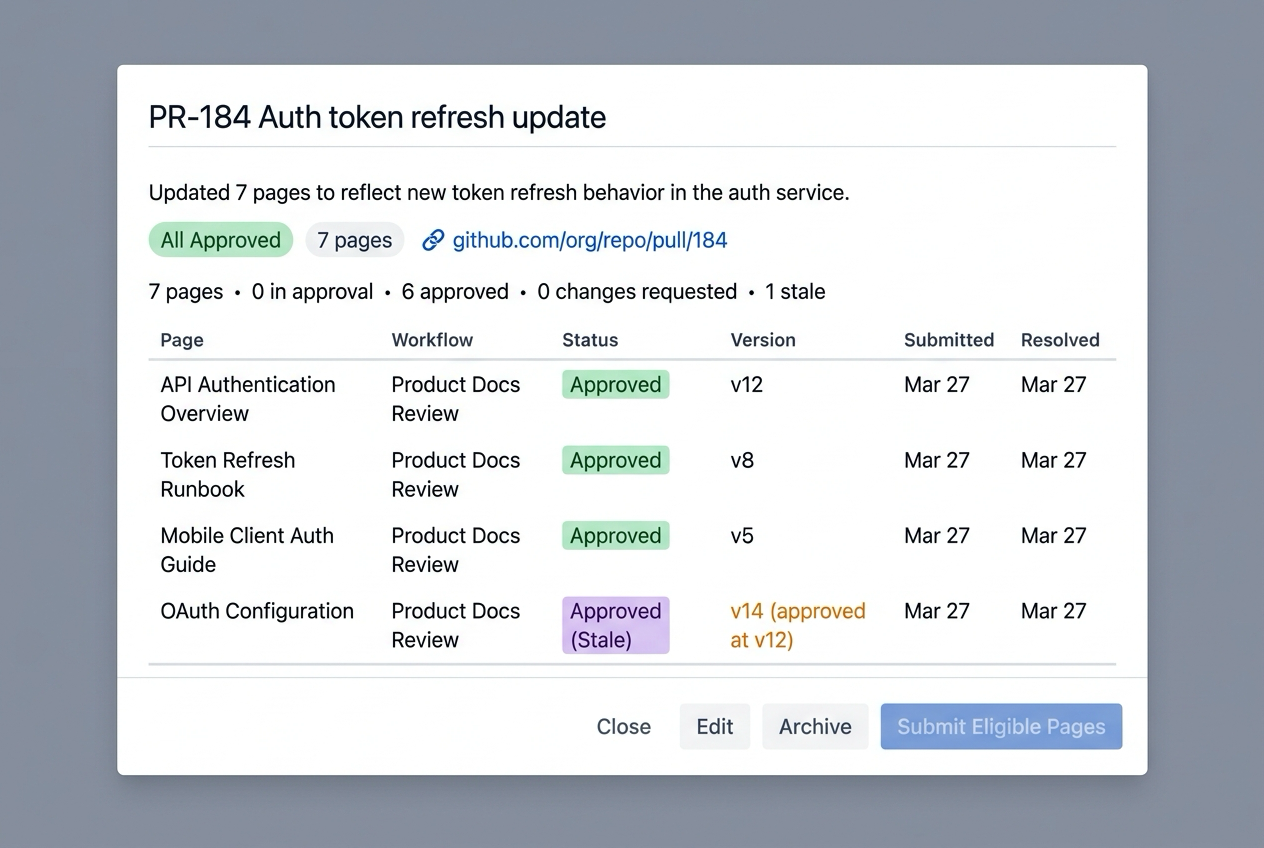
The Change Set detail modal shows per-page approval status, version tracking, and stale detection — with the source PR linked as shared context.
Beyond Automation
Change sets are not limited to automated scenarios. They work for any situation where multiple pages change together:
- Product launches — Release notes, feature guides, and API docs reviewed as one bundle.
- Compliance updates — Policy pages updated for a regulatory change, reviewed with the compliance ticket linked as context.
- Documentation migrations — Pages restructured during a platform migration, tracked as a coordinated review.
- Team onboarding — Training materials updated across multiple pages for a new process.
Info: Change sets build on top of the existing per-page approval model. You do not need to change your existing workflows to use them. They add a grouping layer — not a replacement.
Getting Started
Change sets and the REST API are available now in ApprovalFlow for Confluence.
- In-product: Create change sets from the space dashboard. Group pages, add context, and submit for review.
- Via API: Set up a 3LO OAuth app, request the custom scopes, and start creating change sets programmatically.
For full documentation:
- Change Sets Overview — Concepts, rollup states, and workflow guidance.
- REST API Reference — All 9 endpoints with request and response examples.
- ApprovalFlow on Atlassian Marketplace — Try it free for 30 days.
If you are building automated documentation workflows and want to talk through how change sets fit your setup, reach out at flowdence.io.