

If you’re running Comala Document Management and thinking about your next move — whether that’s a DC-to-Cloud migration, a simpler setup, or just evaluating what else is out there — this guide walks through what actually changes when you switch to a Forge-native approval workflow.
No spin. Just an honest look at what you gain, what you trade, and how the two approaches differ architecturally.
Why Teams Start Looking for Comala Alternatives
Comala Document Management has been in the Confluence ecosystem since 2007. With 6,300+ installs and deep workflow customisation, it’s the incumbent. But three patterns keep pushing teams to evaluate alternatives.
1. DC-to-Cloud Migration Breaks Your Workflows
If you’re migrating from Confluence Data Center to Cloud, Comala workflows don’t migrate automatically. The Confluence Cloud Migration Assistant moves pages, spaces, and metadata — but your Comala workflow definitions, approval states, and activity history stay behind.
You’re left rebuilding workflows from scratch in Cloud, or relying on a third-party migration path. AppFox has built a Comala-to-AppFox migration tool for exactly this reason. But if you’re already rebuilding, it’s worth asking whether you want to rebuild on the same architectural pattern — or move to something natively designed for Cloud.
2. Complexity You Don’t Need
Comala is powerful. It supports global workflows, conditional logic, e-signatures, expiration dates, custom versioning, workflow parameters, and automation triggers. For a regulated enterprise running a full QMS in Confluence, that depth matters.
But for many teams, the reality is simpler: you need pages reviewed and approved before they’re considered final. You need to know who approved what and when. You need a queue of pending reviews and a dashboard to track approval health.
If that’s your use case, Comala’s configuration surface area works against you — more setup time, more training, more things to maintain.
Info: If your workflow is “author submits → reviewer approves → content is final,” you likely don’t need enterprise workflow automation. See the ApprovalFlow overview for what a simpler approach looks like.
3. Connect Architecture vs. Forge Architecture
This is the one most teams don’t think about until their security or compliance team asks.
Comala is built on Atlassian Connect. That means:
- Your data passes through external servers operated by the vendor
- The app runs its own backend infrastructure outside Atlassian’s environment
- You’re trusting a third party’s infrastructure with your content governance data
Forge-native apps are different by design:
- Code runs inside Atlassian’s infrastructure — no external servers
- Data is stored in Atlassian’s own storage layer (Forge Storage)
- Egress is restricted — the app can only call explicitly whitelisted external domains
- Atlassian is investing heavily in Forge as the future of their app platform
For teams that care about data residency, vendor risk, or simply reducing their third-party attack surface, this is a meaningful architectural difference — not marketing.
Connect Architecture (Comala)
Data leaves Atlassian infrastructure
Forge Architecture (ApprovalFlow)
Everything stays inside Atlassian
Connect apps route your data through external vendor servers. Forge apps run entirely inside Atlassian’s infrastructure — no external egress, no third-party data storage.
What ApprovalFlow Does Differently
ApprovalFlow for Confluence takes a deliberately simpler approach to content approval. Here’s what that looks like in practice.
Feature Comparison
| Capability | Comala Document Management | ApprovalFlow |
|---|---|---|
| Architecture | Connect (external servers) | Forge-native (Atlassian infrastructure) |
| Data storage | Vendor infrastructure | Atlassian Forge Storage |
| Approval workflows | Unlimited, fully custom | Single and multi-step |
| Byline integration | Via macro/panel | Native byline actions |
| Approval queue | Activity report | Dedicated approval queue |
| Audit trail | Full activity trail | Full audit trail per page, space, and global scope |
| Analytics dashboard | Reports | Real-time workflow analytics with trends |
| Version tracking | Document versioning | Version-aware per page version |
| E-signatures | Supported | Not yet available |
| Conditional logic | Supported | Not yet available |
| Expiry dates | Supported | Not yet available |
| Workflow scope | Global workflows | Multi-space scope per workflow |
| Page access restriction | Can restrict access | Soft workflow (pages stay viewable) |
| Setup time | Hours to days | Minutes |
| Server/DC support | Supported | Cloud only |
| Hosting | Cloud + DC + Server | Cloud (Forge) |
Where ApprovalFlow Wins
- Setup speed — Define a workflow with named approvers, assign it to a space, done. Authors submit from the byline. No workflow markup language to learn.
- Zero external dependencies — Your content governance data never leaves Atlassian. No vendor servers. No egress to unknown endpoints. ApprovalFlow’s Forge manifest declares no external fetch domains.
- Version-aware by default — Every approval decision is tied to the specific page version that was reviewed. If the page changes after approval, the status changes to “Approved (Stale)” and the audit trail reflects exactly what was approved. See Version-Aware Approvals in Confluence for a deep dive on why this matters for compliance.
- Lighter operational footprint — No workflow parameters, no conditional macros, no trigger configurations. For the 80% of teams who need review-and-approve, this is a feature, not a limitation.
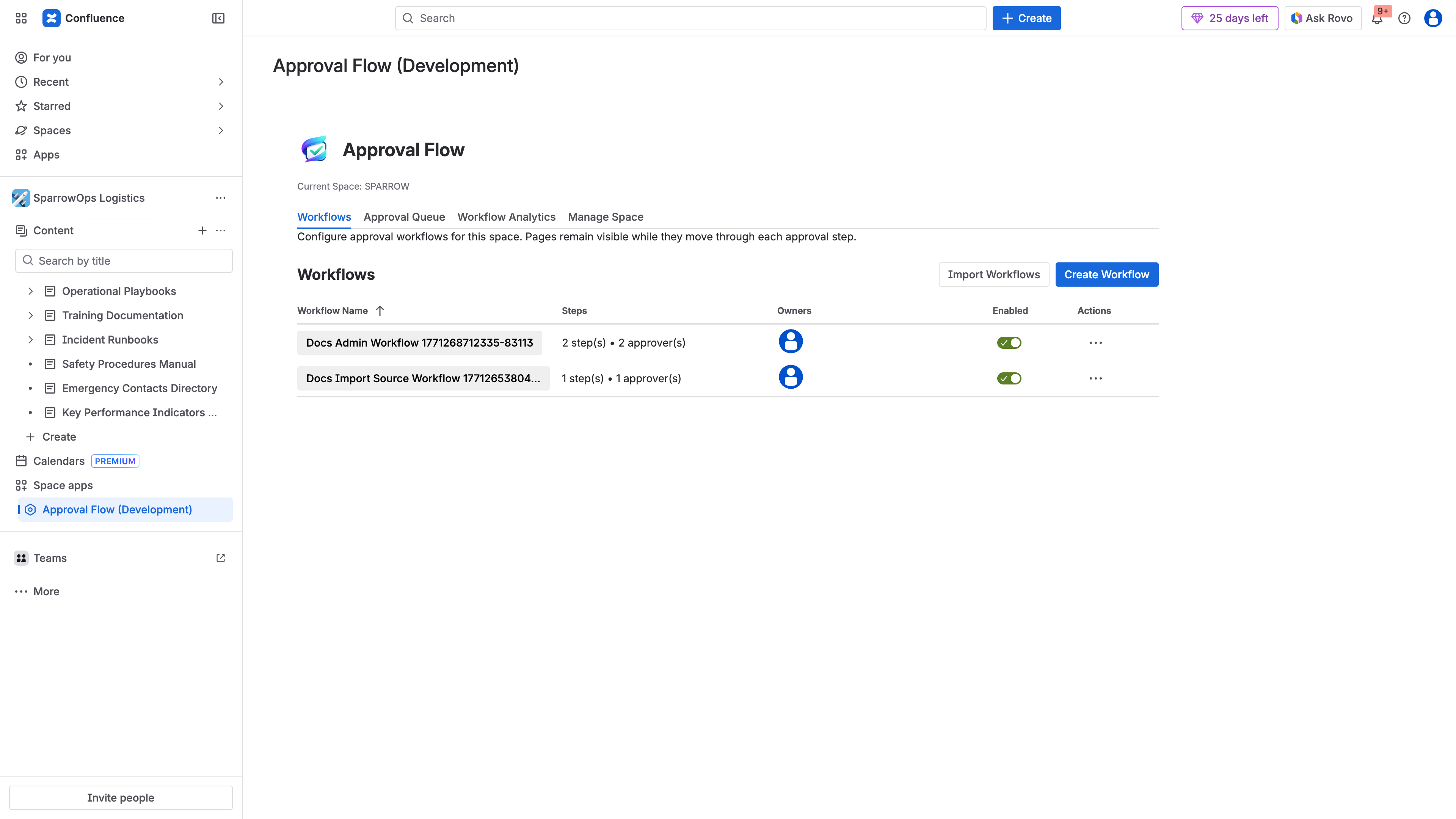
Creating a multi-step approval workflow in ApprovalFlow. Define your steps, assign approvers, and apply it to a space — the entire setup takes minutes, not hours.
Where Comala Still Leads
Let’s be honest:
- Conditional workflows — If you need “route to legal if the page has label X, otherwise route to ops,” Comala can do that. ApprovalFlow currently cannot.
- E-signatures — Regulated industries that need authenticated sign-off have this in Comala today.
- Expiry and re-certification — Content that needs periodic re-approval (SOPs, compliance docs) has built-in date-driven triggers in Comala.
- Server and Data Center — If you’re not on Cloud yet, Comala supports your platform. ApprovalFlow is Cloud-only.
If your workflow requirements include these features, Comala may still be the right fit — or you should wait until these capabilities ship elsewhere.
Tip: Not sure which features you actually use? Map your current Comala workflows before deciding. Many teams discover they use less than 20% of Comala’s feature surface. The ApprovalFlow documentation covers everything the product supports today.
The Forge-Native Advantage, Explained
“Forge-native” isn’t just a label. Here’s what it means technically.
Your data stays inside Atlassian. ApprovalFlow uses Forge Storage (Forge KVS), which runs within Atlassian’s own infrastructure. Approval records, workflow definitions, and audit logs are stored alongside your Confluence data — not on a third-party server.
No external servers to trust (or audit). Connect apps run their own backend infrastructure. That means another vendor in your security review, another SOC 2 to validate, another data processing agreement to negotiate. Forge apps eliminate that dependency entirely.
Atlassian’s investment direction is Forge. Connect is still supported, but Atlassian has been clear: Forge is the future of their app platform. New platform features, performance improvements, and security capabilities are landing in Forge first.
Restricted egress. Forge apps declare exactly which external domains they can call. For ApprovalFlow, that list is empty — it talks to Confluence APIs and nothing else. You can verify this in the ApprovalFlow Data Handling Disclosure.
What the Approval Lifecycle Looks Like
When an author submits a page for approval, the byline updates to show the in-approval status. Approvers see pending actions directly in Confluence — no separate portal, no email-only workflows.
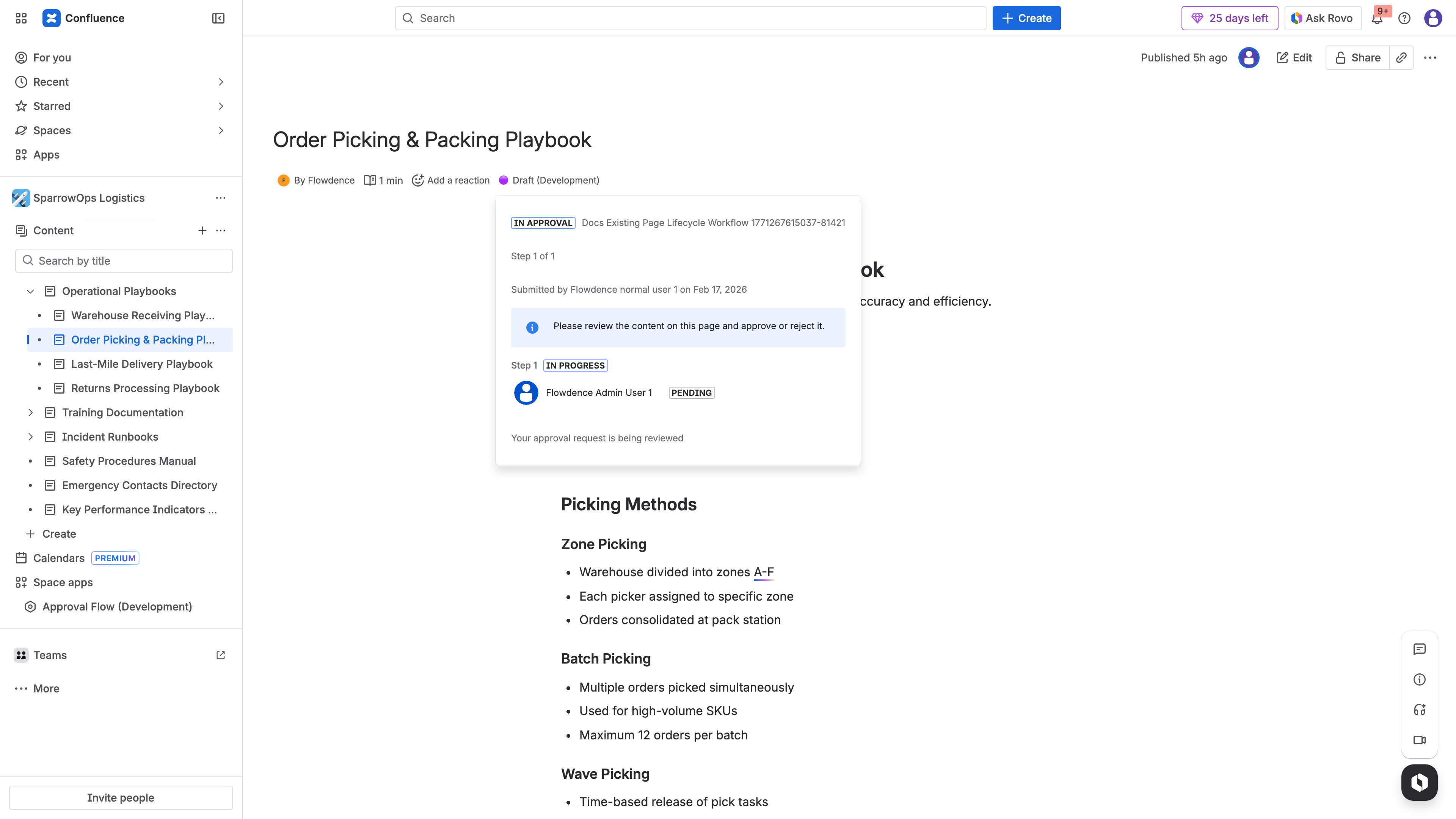
The byline shows “In Approval” status after an author submits a page for review. The approval decision is tied to this specific page version.
Once approved, the byline reflects the approved state with full audit context — who approved, when, and which page version was reviewed.
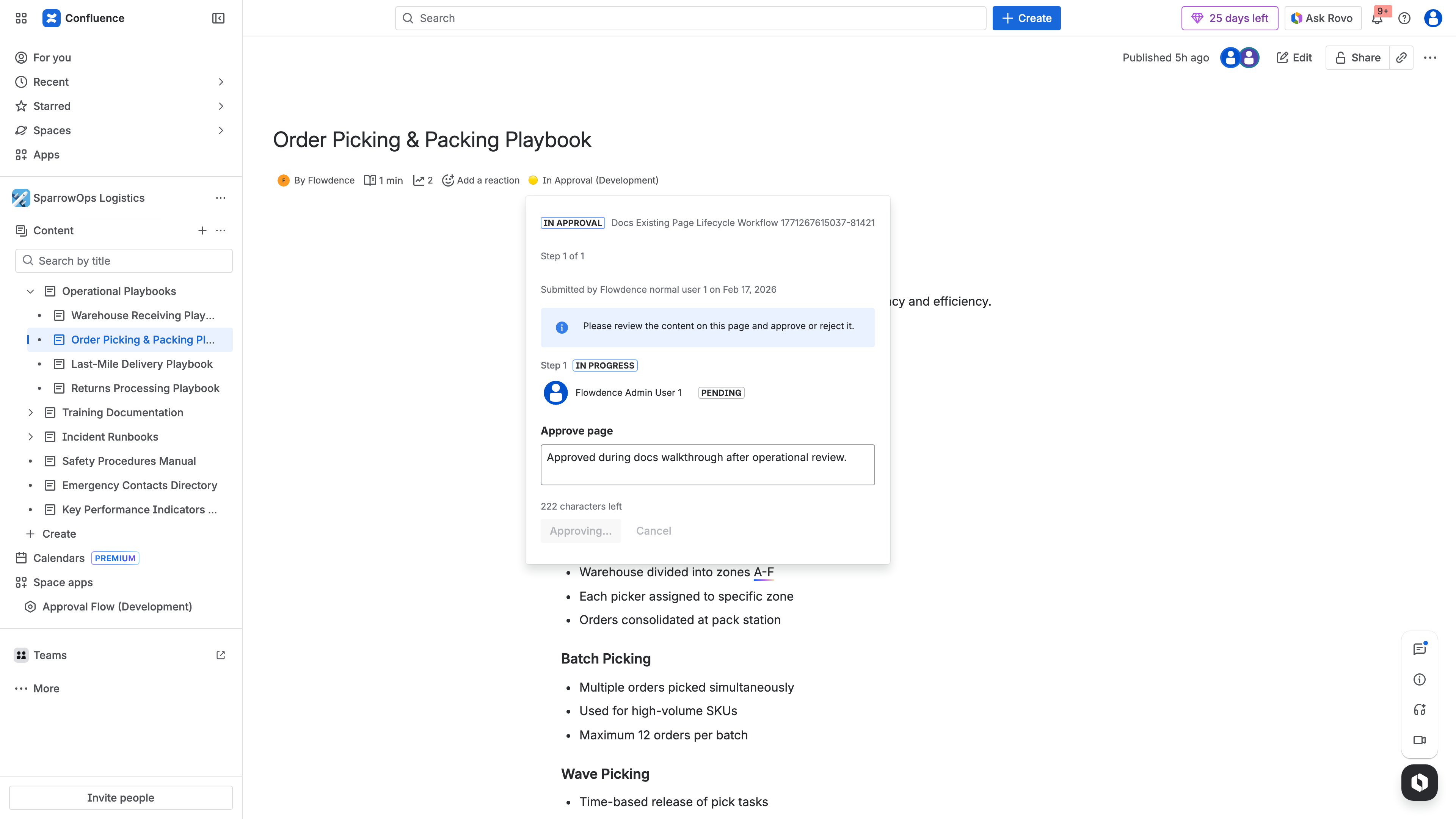
Approved state in the Confluence byline. The approval is bound to the specific page version — if the page is edited after approval, the status becomes stale.
Making the Switch: What to Expect
If you’re evaluating a switch from Comala to ApprovalFlow, here’s a realistic picture.
What Migrates
- Your Confluence pages, spaces, and content migrate normally via Confluence’s standard tools
- ApprovalFlow workflows are defined per space — set them up in your target spaces after migration
What Doesn’t Migrate
- Comala workflow definitions (these are Comala-specific constructs)
- Historical approval states and activity (these live in Comala’s data layer)
- E-signature records (ApprovalFlow does not currently support e-signatures)
What You’ll Need to Do
List which spaces use which Comala workflows and what steps they have
Define steps, assign approvers, apply to space
Save Comala audit trails before decommissioning
Brief the team on byline actions vs Comala panels
For step-by-step setup instructions, see How to Set Up Multi-Step Approvals in Confluence.
For a team with 5-10 spaces using standard review-and-approve workflows, expect a few hours of setup, not days.
Migration Path: Comala DC vs. ApprovalFlow Cloud
The following diagram compares the typical migration path for teams moving from Comala on Data Center to Cloud, versus starting fresh with a Forge-native approach:
Left path: migrating Comala from DC to Cloud requires rebuilding workflows from scratch — definitions, markup, and history don’t carry over. Right path: ApprovalFlow setup is a clean start with no legacy baggage.
Operational Visibility After the Switch
Once your workflows are running, ApprovalFlow gives you centralised visibility across all approval activity.
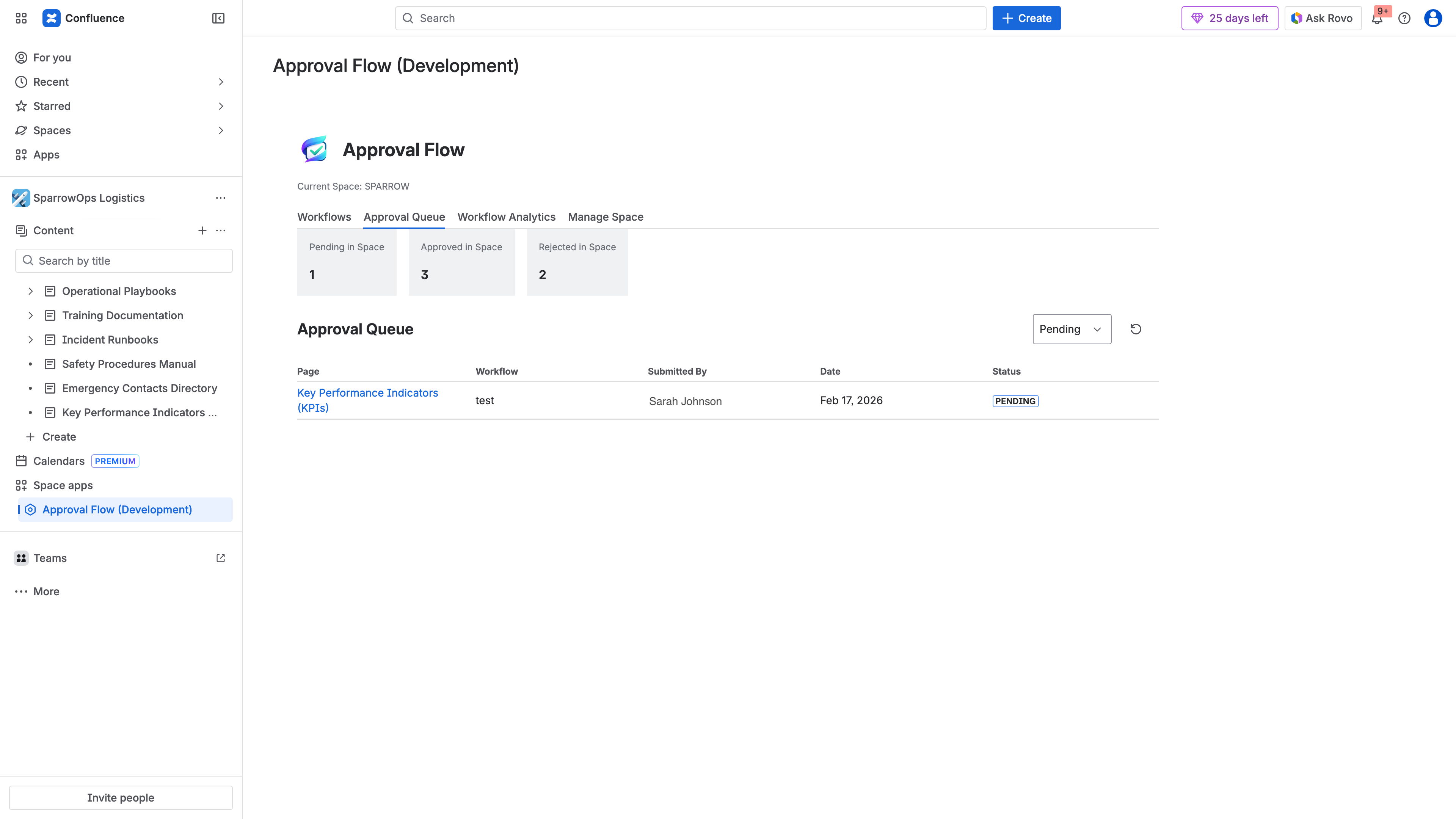
The approval queue shows all pending and completed approvals in one place — filterable by space, workflow, and status. No more hunting through individual pages to find what needs review.
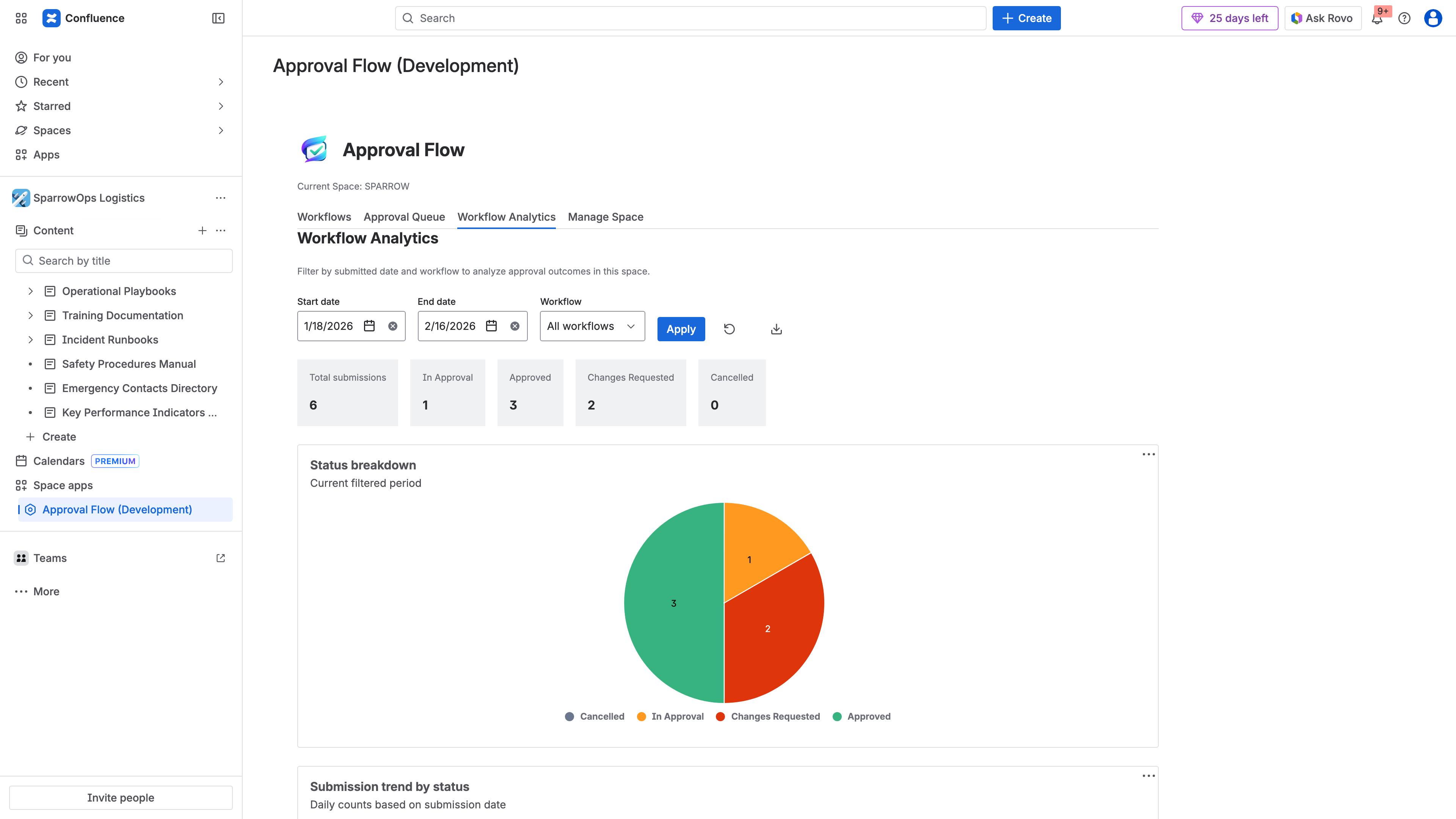
Workflow analytics provide real-time visibility into approval health — track approval rates, turnaround times, and identify bottlenecks across your content governance process.
Who Should Switch (and Who Shouldn’t)
Switch if you:
- Need straightforward review-and-approve workflows without the configuration overhead
- Are migrating from DC to Cloud and rebuilding workflows anyway
- Want your content governance data to stay within Atlassian’s infrastructure
- Value a lighter app footprint with fewer moving parts
- Are a small-to-mid team that doesn’t need e-signatures or conditional routing
Stay with Comala if you:
- Rely on conditional workflow logic (label-based routing, parameter-driven branches)
- Need e-signatures for regulatory compliance
- Use content expiry and re-certification date triggers
- Are running Server or Data Center with no Cloud migration planned
- Have deeply customised Comala workflows that can’t be simplified
Bottom Line
The Confluence approval space has been dominated by a single complex tool for nearly two decades. That tool is powerful — but power comes with overhead that many teams don’t need.
If your approval workflow is “author writes, reviewer approves, content is final,” and you want that process to run natively inside Atlassian’s infrastructure with zero external dependencies, a Forge-native approach is worth evaluating.
Try ApprovalFlow for Confluence on the Atlassian Marketplace →
Learn more: Product overview · Full documentation · Data handling disclosure
ApprovalFlow is built by Flowdence, an Atlassian Marketplace partner. We build Forge-native Confluence Cloud apps for teams that need content governance without complexity.
Related Reading
- ApprovalFlow vs Comala vs AppFox: Confluence Approval Tools Compared — Detailed three-way comparison with validated pricing
- Version-Aware Approvals in Confluence — Why approved pages need version tracking
- How to Set Up Multi-Step Approvals in Confluence — Step-by-step workflow setup guide
- Confluence Approval Audit Trails — Understanding approval evidence for compliance
- Content Governance in Confluence — Moving beyond page restrictions