
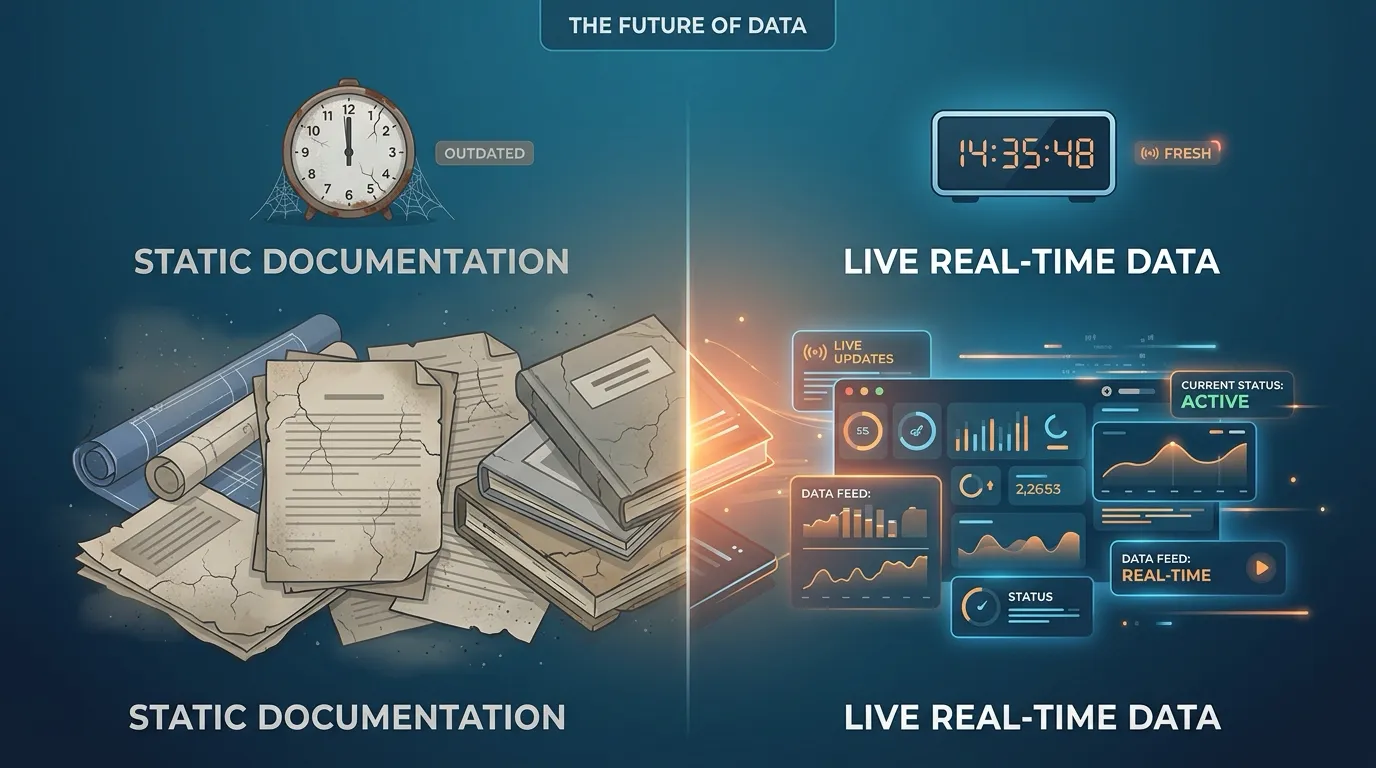
This post is for MuleSoft platform engineers, integration architects, and documentation owners who maintain technical documentation in Confluence alongside their Anypoint Platform deployments.
If you have ever written a Confluence page describing your MuleSoft API landscape and come back to it three months later, you already know the problem. The page was accurate the day you wrote it. By the time someone actually needs it — during onboarding, an incident, or an architecture review — half the details are wrong.
This is not a discipline problem. It is a structural one. And it has a fix.
The Documentation Decay Problem
MuleSoft environments are not static. Applications get promoted from dev to QA to production. API versions increment. Policies are added, removed, or reconfigured. Exchange assets are republished. CloudHub workers are resized. New environments are stood up for load testing or partner integrations.
Every one of these changes makes existing documentation a little more wrong.
What stale documentation actually looks like
Here are the patterns that show up repeatedly in MuleSoft teams that document their integrations in Confluence:
Screenshots of Runtime Manager that no longer match. Someone took a screenshot of the production deployment six months ago. The application has been redeployed four times since then. The version in the screenshot is 1.2.3. Production is running 1.4.1. The worker count changed. The endpoint URL was updated during a domain migration. None of this is reflected in the page.
Copy-pasted API Manager details with wrong policy lists. A runbook says the production API has a rate-limiting policy and a client-id-enforcement policy applied. Since then, the team added an IP allowlist policy and removed the rate limiter. The runbook still says rate-limiting is active. An engineer debugging a 429 error wastes time investigating a policy that was removed months ago.
Architecture diagrams with phantom services. The integration landscape page references five applications. One was decommissioned in the last quarter. Two were renamed during a reorganization. The page still shows the original names and includes the decommissioned service as if it is active.
Exchange asset versions that are two major versions behind. A team’s API specification page references v2.1.0 of an Exchange asset. The current published version is v4.0.0. The endpoint paths, request schemas, and response contracts have all changed. A new developer building a client against the documented spec will produce code that fails against the actual API.
Why manual updates do not work
The standard response to stale documentation is “we need to be better about updating our pages.” This does not work for MuleSoft documentation for three reasons:
-
Change frequency outpaces documentation cadence. In a team doing continuous deployment, a single application might be redeployed dozens of times per quarter. No documentation workflow can keep up with that rate of change manually.
-
The people who deploy are not the people who document. The engineer promoting an application to production and the technical writer maintaining the architecture page are often different people, on different teams, with different priorities. There is no reliable feedback loop between “I deployed a new version” and “someone should update the Confluence page.”
-
Stale documentation is invisible until it causes harm. There is no alert that fires when a Confluence page becomes inaccurate. The page looks exactly the same whether its content matches production or is six months out of date. You only discover the staleness when someone relies on the wrong information.
The most dangerous documentation is documentation that looks current but isn’t. Teams trust it, act on it, and discover the gap only when something fails.
The Real Cost of Stale MuleSoft Documentation
Documentation staleness is not just an inconvenience. It has measurable downstream effects:
Longer incident resolution times. When an on-call engineer opens a runbook during a production incident and the documented deployment state does not match reality, they lose time verifying basic facts before they can start debugging. Every minute spent reconciling documentation with actual state is a minute not spent fixing the problem.
Failed onboarding. New team members rely heavily on documentation to build their mental model of the integration landscape. When the docs are wrong, they build an incorrect mental model and make decisions based on it. This compounds over time as their understanding diverges further from reality.
Security blind spots. If your documentation says a production API has specific security policies applied and those policies have been changed or removed, your security posture assessment is based on fiction. Compliance reviews that reference Confluence pages are only as accurate as the last time someone manually verified the page against Anypoint.
Wasted cross-team communication. Product managers, architects, and compliance officers who read Confluence instead of logging into Anypoint Platform are working with outdated information. Decisions about API strategy, partner integrations, and release planning are made against a stale snapshot of reality.
The Fix: Documentation That Updates Itself
The core insight is simple: if MuleSoft state changes constantly, documentation should pull from the source of truth rather than storing a static copy.
MuleSight for Confluence does exactly this. It is a Forge-native Confluence Cloud app that converts Anypoint Platform URLs into live snapshot macros. Instead of screenshots and copy-pasted values, your documentation contains live references to MuleSoft resources that refresh on demand.
Paste a URL, get a live data card
When you paste an Exchange, Runtime Manager, or API Manager URL into a Confluence page, MuleSight auto-converts it into a rich card that displays current resource state.
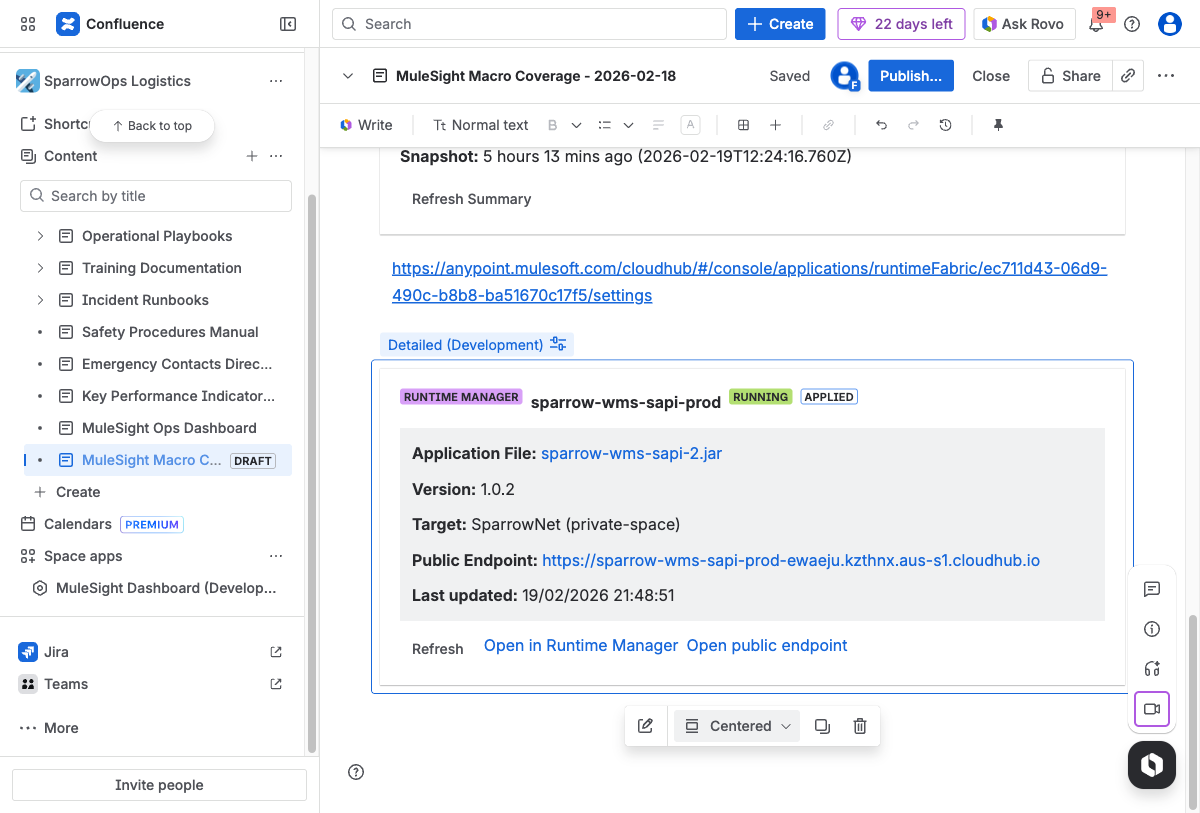
A Runtime Manager snapshot macro rendered inside a Confluence page. The card shows live deployment data — application name, version, target, public endpoint, and last refresh timestamp. One click re-fetches from Anypoint.
An Exchange URL becomes a card showing the asset name, type, version, publish status, and last updated timestamp. A Runtime Manager URL becomes a card showing the application name, deployment status, artifact version, target environment, and public endpoint. An API Manager URL shows the API name, status, version, and security summary including applied policies, SLA tiers, and contract counts.
Each macro includes a Refresh button for on-demand updates and a timestamp showing when data was last fetched. If MuleSight cannot reach Anypoint (network issue, outage), it renders the last cached snapshot with a stale data warning — so the page never goes blank.
Drift detection catches what you miss
The MuleSight Environment Comparison Dashboard compares the same resources across dev, QA, and production on a single screen. If a version is mismatched, a deployment is missing, or a security policy differs between environments, the dashboard flags it as DRIFTED.
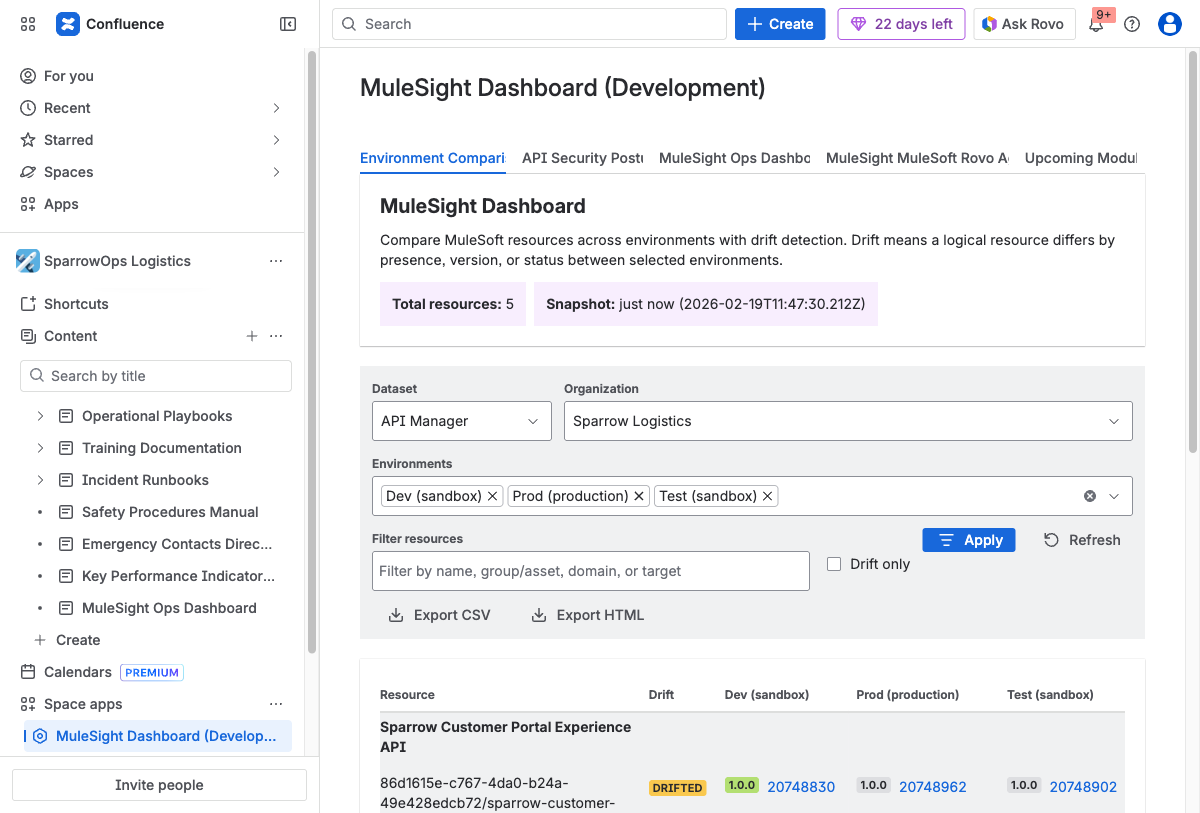
The Environment Comparison Dashboard compares API Manager and CloudHub resources across selected environments. DRIFTED labels flag version mismatches, presence gaps, and status differences. Toggle “Drift only” to filter to just misaligned resources. Export CSV or HTML for audit trails.
MuleSight checks three dimensions for each resource:
- Presence — Is the resource deployed in all selected environments?
- Version — Do artifact versions match across environments?
- Status — Is the resource RUNNING/ACTIVE everywhere, or STOPPED/INACTIVE in some?
This is not operational monitoring — it is documentation-layer verification. It answers the question: “Does our documented understanding of the integration landscape match what is actually running?”
Security posture at a glance
Security misalignment is one of the more subtle forms of documentation staleness. The API Security Posture tab shows per-API, per-environment security data — applied policies, SLA tiers, and contract counts — with drift flags when environments differ.
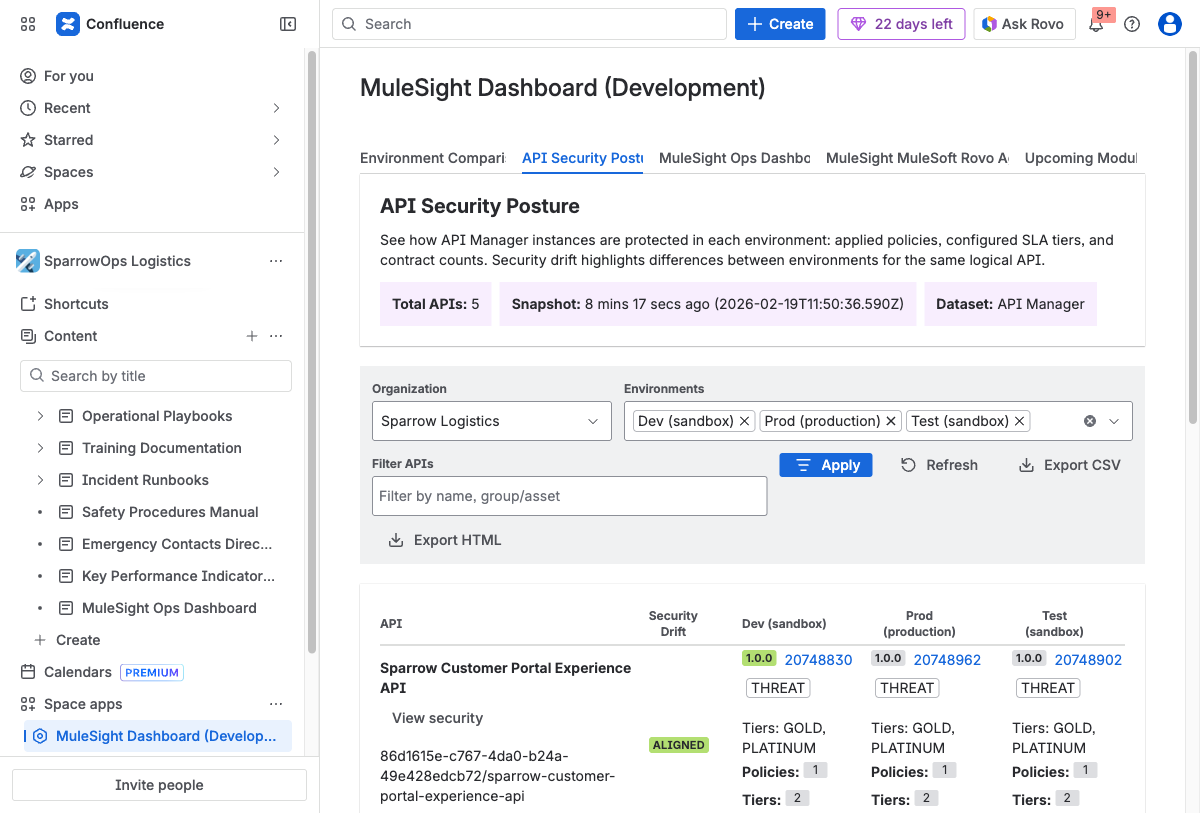
The API Security Posture tab surfaces applied policies, SLA tier definitions, and consumer contract counts across environments. ALIGNED means security configuration matches everywhere. THREAT flags differences that warrant investigation.
You can drill into any API to see the full policy, tier, and contract details per environment. No more logging into MuleSoft and manually comparing each environment to verify what is actually enforced.
What this replaces in your workflow
| Before MuleSight | After MuleSight |
|---|---|
| Screenshot of Runtime Manager pasted into Confluence | Live snapshot macro showing current deployment state |
| Copy-pasted API version number in a runbook | Exchange macro showing current published version and endpoints |
| Manually maintained policy list in a security page | API Manager macro showing applied policies, SLA tiers, and contracts |
| Quarterly “documentation refresh” sprint | Macros refresh on demand; drift dashboard flags inconsistencies |
| ”Ask the platform team what version is in prod” | Anyone with Confluence access sees the answer on the page |
| Log in to MuleSoft, check each environment one by one | One Confluence dashboard, all environments side by side |
| Walk through outdated wiki while alt-tabbing to live MuleSoft | Confluence page IS the live dashboard |
Who benefits most
Documentation owners stop fighting a losing battle against manual freshness. Pages they maintain stay accurate without requiring them to log into Anypoint Platform after every deployment.
Platform engineers spend less time answering “what version is running in prod?” questions. The answer is visible on the Confluence page to anyone who can read it.
New team members onboard against documentation that reflects current state, not a historical snapshot. Their mental model of the integration landscape starts accurate and stays accurate.
Security and compliance teams can reference Confluence pages that show real-time policy coverage and security posture across environments, rather than relying on manually maintained spreadsheets that may be months out of date.
Architects making decisions about API strategy, deprecation timelines, and environment promotion can see the current state of all environments on a single dashboard instead of toggling between Anypoint console tabs.
Enterprise Security by Design
MuleSight runs entirely on Atlassian Forge — Atlassian’s serverless platform. No external servers. No customer data leaves Atlassian’s cloud, with one declared exception: read-only API calls to anypoint.mulesoft.com.
- Forge-native — runs on Atlassian infrastructure. No external servers.
- Read-only — all MuleSoft API calls are GET-only. MuleSight cannot modify your Anypoint environment.
- Zero content egress — no Confluence content is ever sent externally.
- OAuth 2.0 — credentials stored in Forge encrypted storage. Never exposed or logged.
- Eight read-only scopes — true least-privilege design covering organization, environments, Exchange, API configuration, API policies, API contracts, applications, and Runtime Fabrics.
- “Runs on Atlassian” — Forge-native trust badge that Connect apps cannot earn.
No Documentation Is Better Than Wrong Documentation
This is the uncomfortable truth that MuleSoft teams rarely say out loud: if your documentation is wrong, it is actively worse than having no documentation at all.
No documentation means someone knows they need to go verify the facts. They will log into Anypoint Platform, check Runtime Manager, look at the actual deployment, and get the correct answer.
Wrong documentation means someone trusts the page, acts on incorrect information, and does not realize the mistake until something breaks. The confidence that documentation provides is only valuable if the documentation is accurate.
The answer is not to stop documenting. The answer is to change how you document, so that accuracy is structural rather than aspirational.
Live macros that pull from the source of truth eliminate the category of staleness that comes from manual transcription. Drift detection catches the staleness that comes from environmental changes. Together, they make it possible to maintain MuleSoft documentation in Confluence that stays correct without requiring constant manual effort.
Getting Started
MuleSight is available on the Atlassian Marketplace. It is free for up to 10 users, $1.55/user/month for teams of 251–1,000 users, and includes a 30-day free trial on all plans. After installation:
- Open Space settings > Integrations > MuleSight in your Confluence space.
- Enter the Client ID and Client Secret from your MuleSoft Connected App.
- Set your Default Organization ID.
- Save the configuration.
From there, paste any Anypoint Exchange, Runtime Manager, or API Manager URL into a Confluence page. MuleSight converts it into a live snapshot macro automatically.
No Anypoint login is required for Confluence readers. The Connected App credential is configured once by a space admin and stored in Forge encrypted storage.
For full setup instructions, OAuth scope requirements, and feature documentation, see the MuleSight documentation.
FAQ
Why does MuleSoft documentation go stale so quickly?
MuleSoft environments change constantly. Applications are redeployed, API versions are updated, policies are reconfigured, and Exchange assets are republished. Documentation in Confluence relies on static screenshots and manually entered values that nobody updates after the initial write. The result is a growing gap between what the documentation says and what is actually running.
The frequency of change in a typical MuleSoft environment — especially teams doing continuous deployment — makes manual documentation maintenance effectively impossible at scale.
How does MuleSight keep MuleSoft documentation current in Confluence?
MuleSight converts Anypoint Platform URLs pasted into Confluence pages into live snapshot macros. These macros fetch current data from MuleSoft APIs (Exchange, Runtime Manager, API Manager) and display it directly in the Confluence page.
Instead of a screenshot that was accurate on the day it was taken, your page shows a live card with current deployment status, artifact version, applied policies, endpoint URLs, and other resource metadata. The macro includes a Refresh button for on-demand updates and falls back to cached data during Anypoint outages.
Does MuleSight require every team member to have a MuleSoft Anypoint login?
No. MuleSight uses a single Connected App credential that a Confluence space administrator configures in space settings. Any Confluence user who can view the space can see MuleSight snapshot macros and dashboard data. Individual Anypoint Platform accounts are not needed for readers.
Can MuleSight detect when documentation no longer matches production?
Yes. The MuleSight Environment Comparison Dashboard compares the same logical resources across multiple environments (for example dev, QA, and production) on a single screen. It flags drift when a resource has different versions, statuses, or presence across environments. A separate API Security Posture tab flags when applied policies or SLA tier definitions differ between environments.
This is not operational alerting — it is documentation-layer verification that the integration state your team documents matches what is actually deployed.
Is MuleSight read-only against MuleSoft APIs?
Yes. MuleSight only calls GET endpoints on Anypoint APIs. It never writes data back to MuleSoft. This limits the OAuth scope surface and keeps the integration safe for organizations with strict security policies.
Related Posts
- How MuleSight Surfaces Integration Failures Before They Escalate
- Detecting MuleSoft Environment Drift Using Confluence
- How to Embed Anypoint Snapshots in Confluence Pages